
Overview
If your device has red banners on the top and bottom of the screen, follow these steps to disable battery saver mode.
Steps
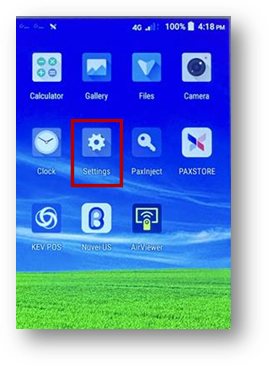
- Click the Settings icon.
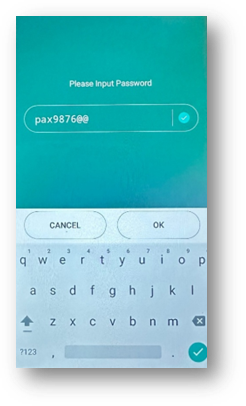
- Enter the password: pax9876@@.
- Note: pax9876@@ is the default password for the devices.
- The password may be different on your device if you have changed it.
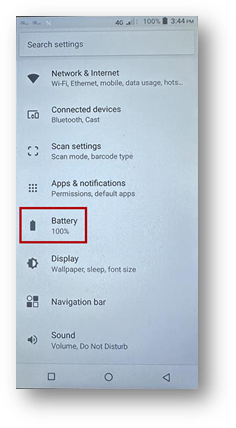
- Click Battery.
- Click Choose battery saver.
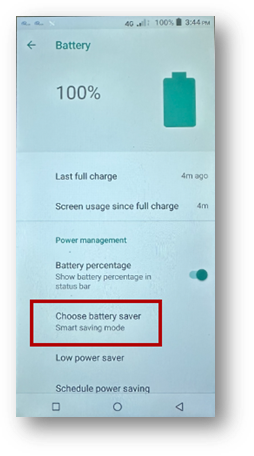
- Choose Smart saving mode.
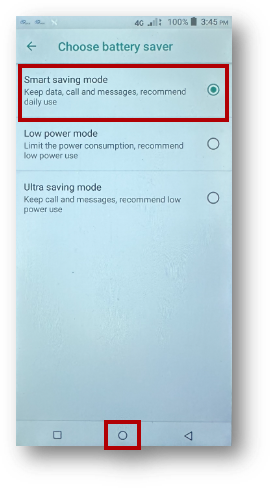
- Go home by clicking the circle at the bottom of the screen.
Outcome
Battery saver mode is disabled and the red banners no longer appear at the top and bottom of the screen.
Troubleshooting
- The password does not work - The default password is pax9876@@, but it may be different if it has been changed on your device.
- You do not see the Battery option - Open Settings first, then scroll if needed to find Battery.
- The red banners still appear - Repeat the steps and confirm that Smart saving mode is selected.