
Nightly Device Transaction Settlement
Our new PAX Point of Sale (POS) Devices automatically perform a settlement of transactions each evening. To ensure this occurs, follow these instructions:
- Keep your device on (do not power it off overnight) and plugged in. For the PAX A920, plug it into a wall outlet overnight.
- Ensure your device is connected to the Internet.
If the close-out does not occur because the device was not powered on or connected, funds settlement and deposits into your bank account may be delayed.
Verify Unsettled Transactions
You can quickly verify if you have unsettled transactions for any of your devices via the Credit Card Transactions report in InTouch Pay. Follow these steps:
- Log in to InTouch Pay.
- Click Reports in the side navigation, then select Credit Card Transactions.
- In the first dropdown in the right-hand navigation, select All Sites.
- In the Status dropdown, select Unsettled.
- Click View.
Note
There are two types of transactions:
- Card Present (CP): Transactions made with a credit card using a POS device.
- Card Not Present (CNP): Transactions processed online. Escalate these to Support if unsettled.
Manually Settling Transactions
If you would prefer not to wait until the next settlement window or have devices that aren't consistently settling due to connectivity issues, you can manually settle transactions:
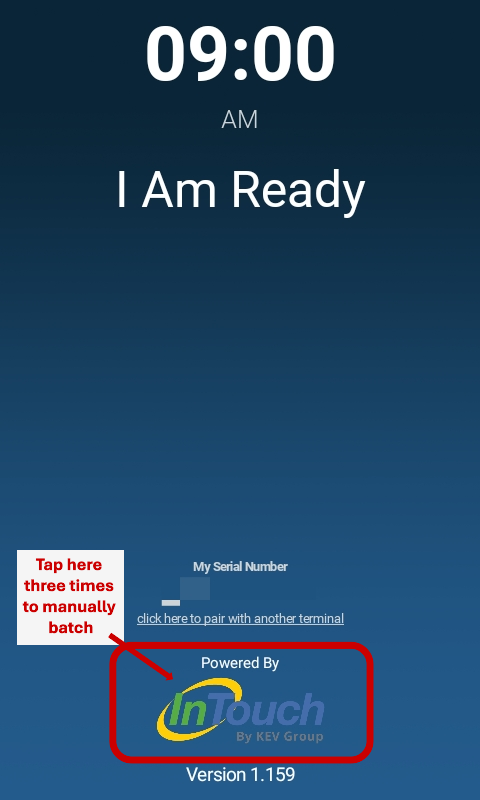
- Confirm that the KEV POS app is version 1.136 or later (check the bottom of the screen).
- Tap the InTouch logo three times.
Impact of Unsettled Transactions
- Funding will not occur, and transactions will not appear in InTouch until they are settled on the device.
- If a transaction is unsettled for more than 30 days, it may appear as a new purchase on the purchaser's credit card statement.